TECHNICAL SPECIFICATIONS:
- PORT CONNECTORS: (4) LC Duplex connectors labeled A, B, C and COMMON.
- WAVELENGTH: 850 nm.
- REMOTE PORT: (1) RJ45 female connector on rear panel accepts Ethernet 10/100Base-T connection and either Telnet commands or Graphical User Interface for remote operation.
- POWER: UL approved 100VAC-240VAC 50Hz-60Hz wall mount power module supplies 12VDC 500 mA to the unit. Has 2-prong, US, non-polarized plug. Replacement power modules may be ordered using ESL Catalog No. 516682.
- DISPLAY: (3) Red, front-panel LEDs indicate switch position, and power status.
- CONTROL: (3) Pushbuttons allow selection of switch position.
- DIMENSIONS: Standard rackmount 19.0" W x 1.75" H x 8.78" D. (48.3 X 4.4 X 22.3 cm)
- WEIGHT: Approximately 4.3 lbs (2.0 kg)
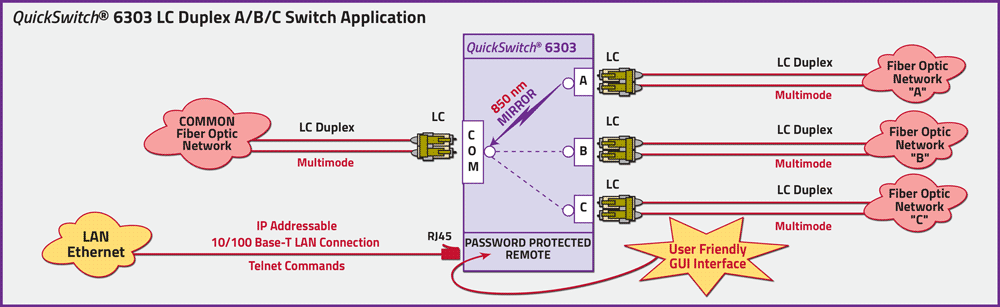
QuickSwitch® 6303 LC Duplex Fiber Optic A/B/C Network Application with Ethernet Remote Control, (Telnet Commands & GUI)
The drawing illustrates a COMMON device connected to the LC Duplex COMMON port sharing between three networks, Fiber Optic Network A, Fiber Optic Network B and Fiber Optic Network C connected to the LC Duplex A, B, and C ports respectively. The RJ45 Remote port allows either Telnet commands or user-friendly GUI software for Remote Control Operation. The IP addressable Remote Control is password protected.
Option: Wide Range Power Supply:(Cat No. 517277) CE, RoHS, and UL listed table mount power module, 100VAC-240VAC, 50-60Hz for use in place of the standard power module that is included with the unit. Has IEC 60320 C14 inlet. Ideal for international applications.
UTILIZING THE USER FRIENDLY REMOTE GRAPHICAL USER INTERFACE SOFTWARE
To connect to the switch from a workstation or computer having access to the LAN that the QuickSwitch® Model 6303 LAN port is connected to, simply launch a standard web browser and type in the appropriate IP address. The Java Applet will be automatically uploaded from the switch upon connection. The environment requirement for the GUI is Java 1.7 and above.
QuickSwitch® 6303 A/B/C Switch Graphical User Interface Main Panel.
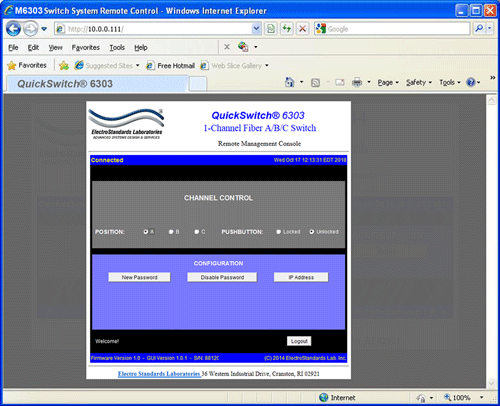
Figure 1: GUI in a standard Web Browser.
10/100BASE-T LAN SETUP
Network Setup
The switch is configured from the factory to use DHCP to automatically get its IP address from a DHCP server on the local area network when connected to the network and powered up. Therefore, a DHCP server is needed on the local area network for the initial configuration. After that, the switch can be configured to use a static IP address. To find the IP address of a switch that it has gotten from the DHCP server, or to reconfigure the IP Address of the switch, use the Lantronix® DeviceInstaller application.
Getting DeviceInstaller
DeviceInstaller requires Microsoft’s .NET Framework version 4.0 or higher. If the .NET Framework is not already installed, it must first be installed. The .NET Framework can be downloaded from Microsoft’s website, either as a web install, or as a standalone installation. The latest version of DeviceInstaller can be downloaded from Lantronix’s website.
Changing Position and Lockout Status:
To change the switch position of a channel, click on the radio button “A”, “B”, or “C” as desired. Locking and unlocking the front panel pushbuttons can be done by clicking on the “Locked” or “Unlocked” radio buttons via the GUI (Graphical User Interface). See Figure 2
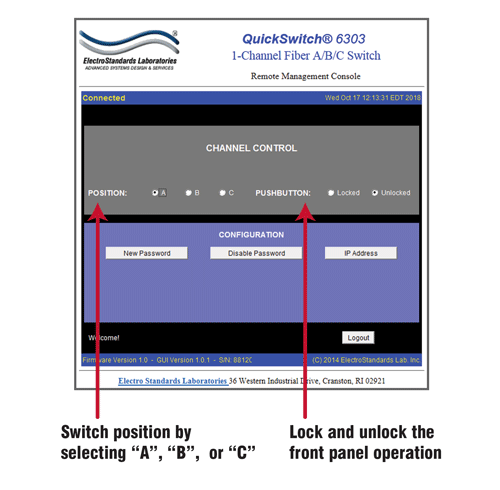
Figure 2: Change switch position and lockout status from the QuickSwitch® 6303 Graphical User Interface.
Querying The Status of QuickSwitch® 6303 via the Graphical User Interface
Once connected, the GUI will stay up-to-date on the present position and status of the unit.
Any changes that are made outside of the GUI, such as by pushbutton, will be reflected in the GUI. Auto-send of updates should be enabled, in order to reflect the most accurate status updates such as pushbuttons. These changes will cause the radio buttons of the GUI to automatically change to show the new status. The GUI will report the source of the most recent change in the bottom left of the panel See Figure 3.
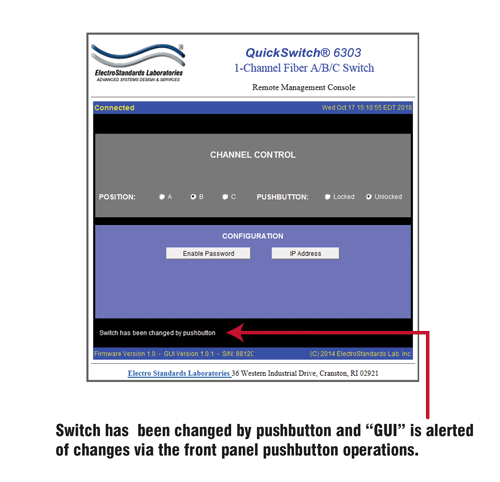
Figure 3: Querying the status of the unit.
Ordering Information
- Catalog Number: 306303
- Model Number: 6303
- Base Price: See website or contact us for current pricing and availability.
- Optional Wide-Range power supply: Catalog Number 517277 IEC C14 Inlet, 100-240VAC, 12 VDC
Documentation & Support
- Specification Sheet (PDF) Download Available.
- Product Manual available upon request.
- For custom fiber optic network switch requirements contact our sales support team 401-943-1164 or email eslab@electrostandards.com
- We welcome international inquiries and ship worldwide.
Shipping and Returns 
- Shipped via UPS ground (unless otherwise requested).
- Freight Charges prepaid and added to invoice. We can estimate freight charges for you.
- Return policy: contact us within 30 days of shipment for an RMA number. Items returned without RMA not accepted. Please refer to our full return policy in our Terms and Conditions found on our website.
QuickSwitch® is a registered trademark of Electro Standards Laboratories.
QuickSwitch® Fiber Optic Switches are available in many configurations: auto fallback, switch/converters, multimode & single mode, and secure off-line positions. Check out our complete line of QuickSwitch® fiber optic switches.
For custom fiber optic network switches contact our friendly sales support staff at 401-943-1164; or email: eslab@electrostandards.com, or complete our On-Line Custom Fiber Optic Switch Form:/Products-Custom/Fiber-Switch/
Electro Standards can supply all your Fiber Optic Cable requirements.
All data switches, data communication products, and data acquisition products are subject to a one year warranty against manufacturing defects. The limit of ESL liability is limited to the cost of the ESL product provided.
All ESL products are available for export.
Electro Standards welcomes International inquiries: commutateurs à fibres optiques, interruptores de fibra óptica, switch in fibra ottica, switches de fibra óptica, fiberoptiska switcher.
*Prices online are subject to change and verification.