QuickSwitch® 6313 4-Channel SC Duplex A/B/C Fiber Optic Switch, Ethernet Remote Control with GUI & Telnet
Overview
The QuickSwitch® 6313 4-Channel SC Duplex A/B/C Switch with Telnet and GUI allows the user the capability of sharing a single port SC Duplex interface device, connected to the "COMMON" port, among three other devices, connected to the "A", "B", and "C" ports for each of the four channels. The QuickSwitch® 6313 is enclosed in a 2U, full rack size, all metal, black chassis designed to fit in a standard 19" rack. Remote access can be accomplished using an Ethernet 10/100Base-T connection via Telnet Commands or Graphical User Interface. Users can then monitor status, lockout front panel pushbutton control, and control switch position.
-
IP Addressable for Critical Network Alternate-Path Switching!
-
Password Protected Ethernet Remote Control.
-
User Friendly GUI for Remote Operation.
FEATURES OF THE MODEL 6313 SC DUPLEX FIBER SWITCH:
- Each of the four channels allows quick connection to any one of three SC interface devices from one COMMON device.
- The switch ports are transparent to all data.
- All fiber signals are switched via break-before-make MEMS-based mirror/prism switch technology.
- Switch maintains last set position on power loss and continues to pass data.
- Simultaneous control of all channels
- Front panel pushbutton control.
- Control of the switch position from a 10/100Base-T LAN Ethernet environment. IP addressable.
- Remote Control Telnet Command Interface that allows the user to control switch position, lockout front panel operations, obtain switch status, as well as query firmware version, query serial number and enable/disable autosend of switch positions.
- Graphical User Interface that allows the user to control switch position, lockout front panel operations, and obtain switch status.
- Remote control of the switch is password protected, where the password protection can be disabled.
- Front panel LED's display present position and power status.
- All A, B, and COM ports are SC, Multi-mode, 62.5/125 micron, and support a wavelength of 1300 nm.
- The fiber ports are configured per TIA/EIA-568-B.3, where the TX of the COM port is routed to the RX of the A/B ports and vice versa.
TECHNICAL SPECIFICATIONS:
- FIBER SIZE & WAVELENGTH: 62.5/125 micron, wavelength 1300 nm.
- PORT CONNECTORS: (4) LC duplex connectors labeled A, B, C and COMMON per channel (16 total).
- CONTROL: (3) Pushbuttons allow selection of switch position for all channels.
- DISPLAY: (3) Red LED's display switch position and power status.
- SUPERVISORY REMOTE CONTROL: (1) RJ45 (F) connector accepts 10/100 BASE-T LAN Ethernet uses both TELNET commands and a GUI interface for Remote Control operation.
- POWER: UL Approved 100VAC/240VAC, 50Hz/60Hz wall mount power module supplies 12 VDC, 500 mA to the unit. Has 2-prong, US, non-polarized plug.
- DIMENSIONS: Rackmount, 19.0" W x 3.48" H x 10.67" D.
- (48.3 x 8.9 x 27.1 cm).
- WEIGHT: Approximately 7.0 lbs. (3.2 kg).
SC DUPLEX A/B/C APPLICATION WITH TELNET & GUI REMOTE CONTROL:
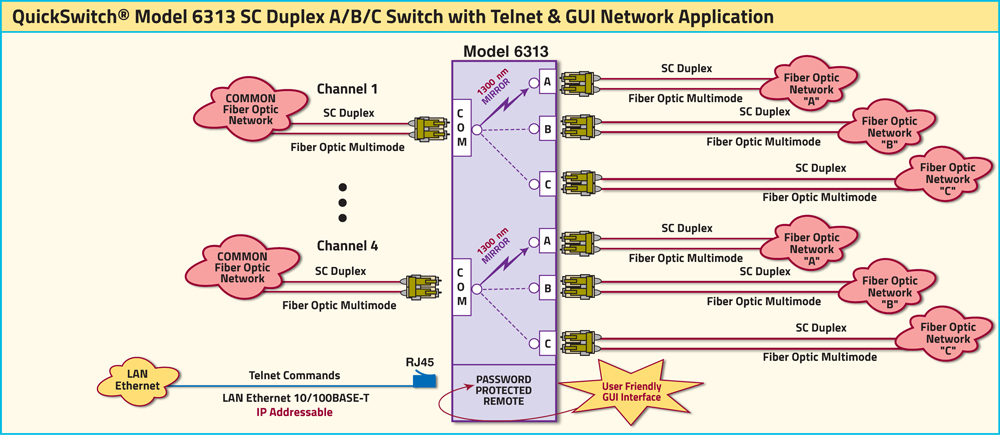
The drawing illustrates a COMMON device connected to the LC Duplex COMMON port sharing between three networks, Fiber Optic Networks A, B, and C connected to the SC Duplex A, B, and C ports for each of the four channels. The RJ45 Remote port allows either Telnet commands or user-friendly GUI software for Remote Control Operation. REMOTE is password protected.
UTILIZING THE USER-FRIENDLY REMOTE GRAPHICAL USER INTERFACE SOFTWARE
To connect to the switch from a workstation or computer having access to the LAN that the QuickSwitch® 6313 LAN port is connected to simply launch a standard web browser and type in the appropriate IP address.
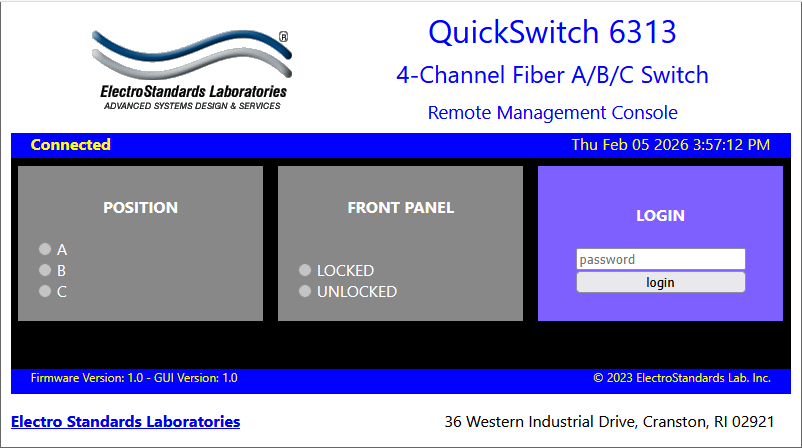
Figure 1: GUI in Standard Web Browser
LOGGING into the Remote Control GUI
Once logged in, the user can perform one of several actions:
- Change the switch position.
- Lockout control of the switch's front panel
- Obtain switch status
- Change the login password
- Re-configure the switch's IP address

Figure 2: Model 6301 GUI Login screen
CHANGING POSITION AND LOCK STATUS
To change the switch position, click on the radio button “A” or “B” as desired. Locking and unlocking the front panel pushbutton can be done by clicking on the “Locked” or “Unlocked” radio buttons. See Figure 3.
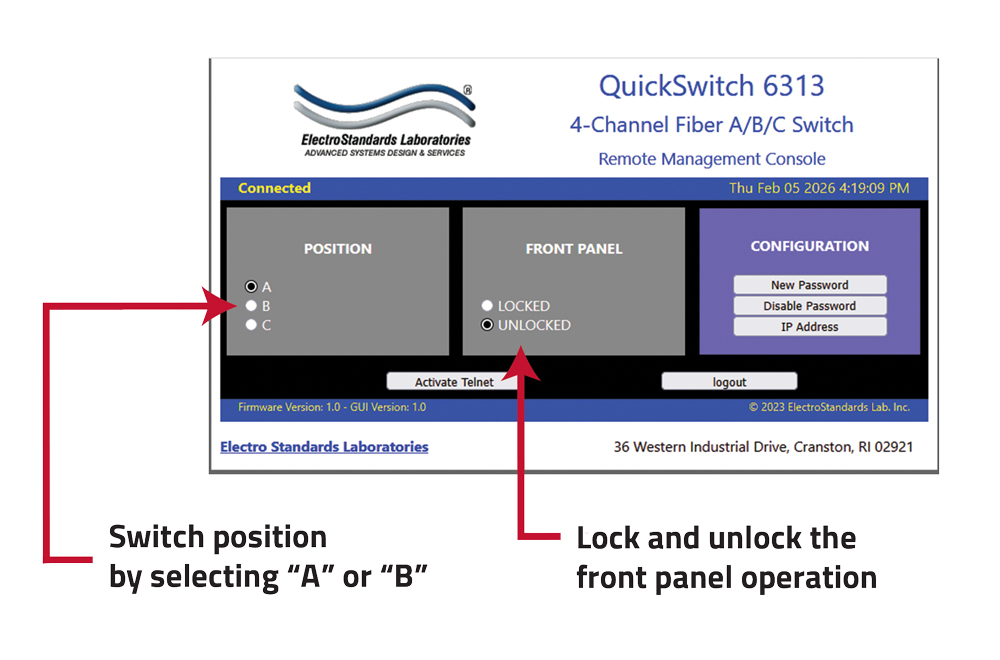
Figure 3: Change the switch position and lockout from the GUI.
QUERYING THE STATUS OF THE UNIT
Once connected, the GUI will stay up-to-date on the present position and status of the unit. Any changes that are made outside of the GUI, such as by pushbutton, will be reflected in the GUI. These changes will cause the radio buttons of the GUI to automatically change to show the new status. See Figure 4.
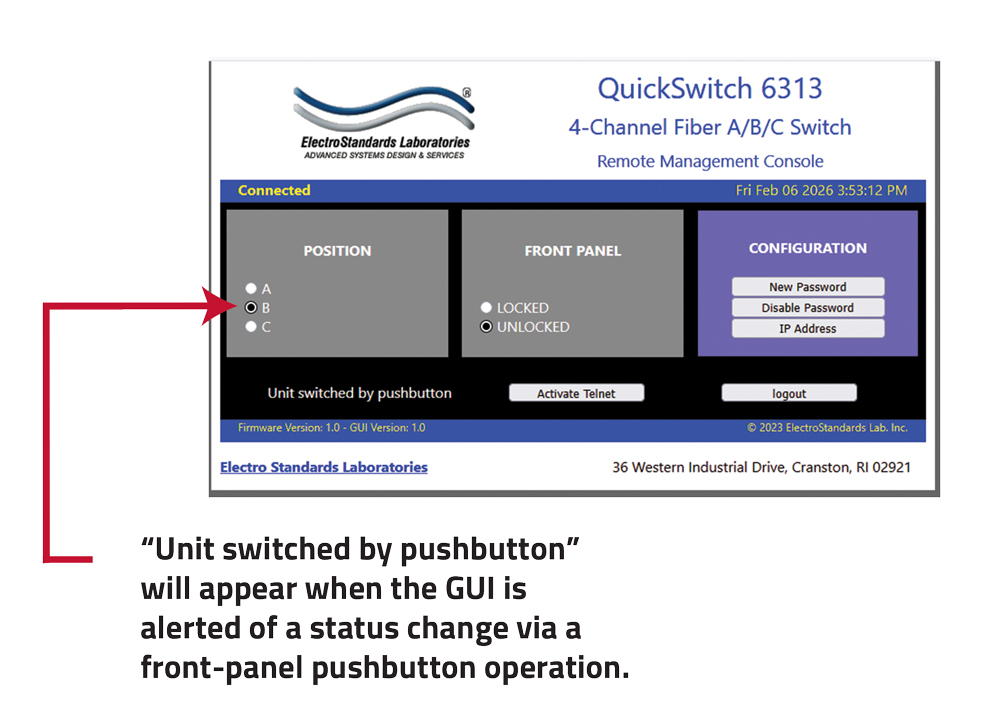
Figure 4: Changes made outside the GUI cause its radio buttons to automatically change to show the new status.
Ordering Information
- Catalog Number: 306313
- Model Number: 6313
- Base Price: See website or contact us for current pricing and availability.
- Optional Wide-Range power supply: Catalog Number 517277 IEC C14 Inlet, 100-240VAC, 12 VDC
Documentation & Support
- Specification Sheet (PDF) Download Available.
- Product Manual available upon request.
- For custom fiber optic network switch requirements contact our sales support team 401-943-1164 or email eslab@electrostandards.com
- We welcome international inquiries and ship worldwide.
Shipping and Returns 
- Shipped via UPS ground (unless otherwise requested).
- Freight Charges prepaid and added to invoice. We can estimate freight charges for you.
- Return policy: contact us within 30 days of shipment for an RMA number. Items returned without RMA not accepted. Please refer to our full return policy in our Terms and Conditions found on our website.
TO READ THE ARTICLE "HOW TO DETERMINE THE RIGHT FIBER OPTIC NETWORK BACKUP SWITCH FOR YOUR APPLICATION" EITHER CLICK THE LINK OR APPLICATION NOTE ICON AT TOP OF PAGE.
QuickSwitch® is a registered trademark of Electro Standards Laboratories.
QuickSwitch® Fiber Optic Switches are available in many configurations: auto fallback, switch/converters, multimode & single mode, and secure off-line positions. Check out our complete line of QuickSwitch® fiber optic switches.
For custom fiber optic network switches contact our friendly sales support staff at 401-943-1164; or email: eslab@electrostandards.com, or complete our online Custom Product Request form.
Electro Standards can supply all your Fiber Optic Cable requirements.
All data switches, data communication products, and data acquisition products are subject to a one year warranty against manufacturing defects. The limit of ESL liability is limited to the cost of the ESL product provided.
All ESL products are available for export.
Electro Standards welcomes International inquiries: commutateurs à fibres optiques, interruptores de fibra óptica, switch in fibra ottica, switches de fibra óptica, fiberoptiska switcher.
*Prices online are subject to change and verification.
All data switches, data communication products, and data acquisition products are subject to a one year warranty against manufacturing defects. The limit of ESL liability is limited to the cost of the ESL product
*Prices online are subject to change and verification.